

Most estate plans still live on paper. Most of daily life does not.
Bank statements arrive by email. Family photos sit in the cloud. Bills renew automatically. A phone receives the two-factor code needed to open nearly everything else.
A business owner may also depend on a domain name, online bookkeeping account, cloud files, or social media page that only one person knows how to manage.
That raises a practical estate-planning question: if you could not handle these accounts yourself, would the right person know what exists, have legal authority to act, and understand where to begin?
A password list can help, but it is not the whole answer. A useful digital estate plan has three parts:
- Legal authority for the right person to act
- A current map of the accounts that matter
- Secure instructions for locating access information
What Counts as a Digital Asset?
“Digital asset” is a broad term. It can include property with financial value, information with sentimental value, and accounts that simply need attention.
For many Colorado families, the list may include:
- Email accounts and the inbox used for password resets
- Cloud photo and file storage
- Online banking, investment, and payment accounts
- Cryptocurrency, digital wallets, and recovery information
- Social media and creator accounts
- Websites, domain names, online stores, and business systems
- Utilities, subscriptions, and recurring charges
- Digital books, music, games, airline miles, and rewards
- Phones, computers, external drives, and authentication apps
Not everything on this list can be transferred in the same way. Some digital assets are property. Others are licensed under a service agreement. Some accounts contain private communications that may be treated differently from basic account records.
The first step is not assuming everything can be handed over. It is identifying what exists and deciding what should happen to it.
Knowing the Password Is Not the Same as Having Authority
Suppose an adult child knows the passcode to a parent’s phone and the password to the parent’s primary email account.
That may solve one technical problem. It does not necessarily answer whether the child has authority to access, copy, close, transfer, or manage every connected account.
Colorado has adopted the Revised Uniform Fiduciary Access to Digital Assets Act. This law provides a framework for certain fiduciaries, including personal representatives, trustees, conservators, and agents acting under a power of attorney, to request access to digital assets.
What a fiduciary can access may depend on several things:
- The language in the will, trust, or power of attorney
- Directions the account owner provided
- Online tools offered by the account provider
- The provider’s terms of service
- Federal privacy and computer-access laws
- Whether the request concerns account records or the contents of private communications
That is why choosing the right person and granting appropriate authority matter. A family member should not assume that possessing a password automatically provides permission to use an account.
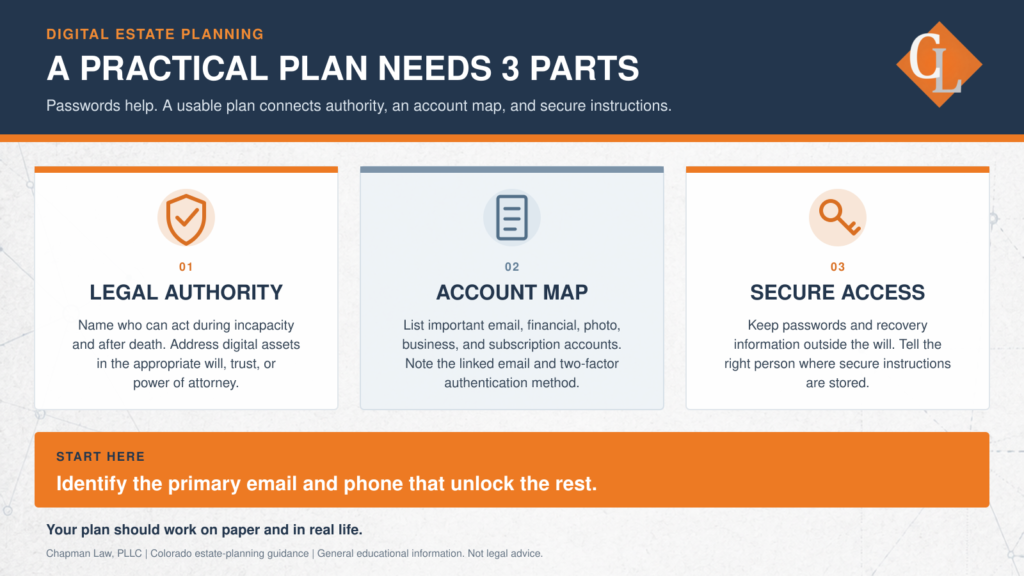
A Practical Three-Part Digital Estate Plan
1. Give the Right People Legal Authority
Your estate-planning documents should address who may handle digital matters and when that authority begins.
Depending on your circumstances, that may involve:
- An agent under a financial power of attorney who can address digital matters during incapacity
- A personal representative who can administer digital assets after death
- A successor trustee who can manage digital property connected to a trust
- Clear directions concerning electronic communications and other digital assets
- Backup decision-makers if the first person cannot serve
The person who is good at paying bills may not be the person who understands a cryptocurrency wallet or business website. Some families choose one fiduciary who can obtain technical help. Others may divide responsibilities where the documents and account rules allow it.
The important part is making the choice deliberately.
2. Create an Account Map
A will may become part of a public court record after death. It is generally not a good place for passwords, recovery keys, Social Security numbers, or complete account information.
Instead, consider maintaining a separate digital-asset inventory. The inventory can tell your fiduciary:
- Which provider or institution holds the account
- Which email address or username is connected to it
- What the account is used for
- Whether it has financial, business, or sentimental value
- Whether a beneficiary or legacy contact has been named
- How two-factor authentication works
- Where secure access information is stored
- Whether you want the account preserved, transferred, archived, memorialized, or closed
Think of this inventory as a map. It does not need to display every password in plain text. It needs to help the right person identify the accounts and locate the approved access method.
3. Plan for Secure Access
Strong legal documents will not help someone find an account that nobody knows exists. A detailed spreadsheet will not help either if it has not been updated in five years.
The practical part of a digital estate plan may include:
- A reputable password manager
- A securely stored physical record
- Recovery codes kept separately from the primary device
- Instructions for locating device passcodes
- Platform-specific legacy settings
- A recurring reminder to review the information
Apple, Google, and Facebook all offer tools for planning what may happen to an account after death.
For example, Apple allows a user to select a Legacy Contact. Google offers Inactive Account Manager. Facebook allows users to select a legacy contact for a memorialized profile.
These tools have different rules and limitations. They also should not be treated as replacements for a will, trust, or power of attorney. The platform setting and the legal documents should be reviewed together.
Two-Factor Authentication May Be the Real Obstacle
Passwords receive most of the attention, but two-factor authentication is often the harder problem.
A login code may be sent to:
- A phone number that has been canceled
- An email account nobody else can open
- An authentication app stored on a locked device
- A hardware key that nobody can locate
Consider a family helping an aging parent organize online bills, insurance information, telehealth records, and cloud photos. The family may know which accounts exist, but every security code is sent to the parent’s phone.
If that phone becomes unavailable or its service is canceled too quickly, the family may lose an important path to identifying or recovering other accounts.
The goal is not to weaken security. It is to avoid making one device the only doorway to an entire digital life.
Digital Planning Also Matters During Incapacity
Digital estate planning is not limited to what happens after death.
An agent acting under a power of attorney may need to manage online bills, insurance portals, tax records, property accounts, business systems, or electronic communications while the account owner is still alive but unable to act.
That is different from the role of a personal representative administering an estate after death.
A complete plan should account for both situations:
- Who can act during incapacity?
- Who can act after death?
- What authority does each person have?
- Where will each person find the information needed to begin?
A Simple Digital Estate Review
You do not need to catalog every online account in one sitting. Start with the accounts that control or connect to everything else.
- Identify your primary email account.
- Identify the phone, email address, or app that receives authentication codes.
- List the ten online accounts that would matter most to your family, finances, or business.
- Review the legacy or inactive-account settings offered by important providers.
- Confirm that your will, trust, and power of attorney address digital assets where appropriate.
- Tell the people you selected that they have a role and where your non-public instructions can be found.
- Review the information annually and after a marriage, divorce, death, business change, or other major event.
Connecting Your Legal Plan to Your Digital Life
Digital estate planning does not require placing every password in a binder or giving someone unlimited access today.
It requires a thoughtful connection between your legal documents and the way your life actually works.
Chapman Law helps Colorado families decide who should act, what authority that person may need, and how digital assets fit with wills, trusts, powers of attorney, and estate administration. If your current plan does not address online accounts or electronic communications, a focused review can help identify what may be missing.
Helpful Resources for Digital Estate Planning
- Download Chapman Law’s Digital Assets Guide: What Happens to your Digital Assets Brochure Download. Visit our Client Resource Library to download What Happens to Your Digital Assets?, a practical guide to online accounts, devices, passwords, digital memories, and fiduciary access.
- Learn More About Colorado Estate Planning
Learn how wills, trusts, powers of attorney, advance directives, and related planning documents can work together. - Colorado’s Revised Uniform Fiduciary Access to Digital Assets Act
Official information from the Colorado General Assembly concerning fiduciary access to digital assets. - Apple: How to Add a Legacy Contact
Instructions for choosing someone who may request access to certain Apple Account data after your death. - Google: About Inactive Account Manager
Information about selecting trusted contacts and deciding what should happen after a Google Account has been inactive for a specified period. -
Platform-specific tools can be useful, but they do not replace properly prepared estate-planning documents or individualized legal advice.
Does your estate plan address your digital life? Contact Chapman Law to schedule a consultation.
Information shared here is general educational information and is not legal advice. Every situation is different, and you should speak with an attorney about your specific circumstances.